Liquid Glass Design
Makes interactions across iOS more delightful, refracts and reflects content in real time, bringing even more focus to what's on your screen with a fresh new look for app icons.

iOS 26
Featuring Liquid Glass design, enhanced Apple Intelligence, and revolutionary features that transform how you interact with your iPhone.
Released January 2026
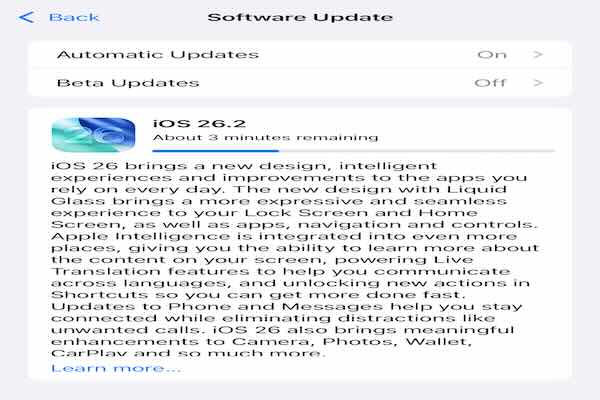
iOS 26 works on iPhone XR and later models, bringing revolutionary new features to millions of devices.
Check CompatibilityUpdate wirelessly or through your computer. We'll guide you through every step.
Installation GuideiOS 26 includes important security improvements and bug fixes to keep your iPhone protected.
Security DetailsMakes interactions across iOS more delightful, refracts and reflects content in real time, bringing even more focus to what's on your screen with a fresh new look for app icons.
Learn about content in any app by pressing screenshot buttons. Highlight to search, jump into Google results, find related items from third-party apps, or ask ChatGPT.
Automatically translate incoming Messages, FaceTime captions appear on screen during calls, Phone audio is translated in real time, and AirPods provide hands-free translation.
Mix two emoji together or combine with descriptions. Choose expressions for people, modify hairstyles and facial hair. More styles with ChatGPT including Oil Painting and Anime.
Streamlined design for easier access to Photo and Video modes. Lens cleaning hints alert you when smudged. Take photos with new AirPods gesture on AirPods 4 and Pro 2.
Screen incoming calls from unknown numbers, getting the caller's name and reason before the phone rings. Hold Assist keeps your place in queues and rings when a live agent is ready.
Screen unknown senders, add backgrounds to conversations, create polls for group decisions, and see typing indicators showing exactly who is about to respond.
New Liquid Glass design with tab bar navigation, compact incoming calls, Tapbacks in Messages while driving, pinned conversations, and Live Activities on the Dashboard.
Visited Places detects restaurants and shops you visit for easy sharing. Preferred routes learn your frequent drives between regularly visited places like home and work.
Lyrics Translation and Pronunciation help understand and sing along to songs in any language. AutoMix transitions songs like a DJ with beatmatching for continuous playback.
Updated boarding passes with flight information, order tracking (beta) using Apple Intelligence, and instalment financing options for credit and debit card purchases with Apple Pay.
New all-in-one gaming destination. Challenge friends, track scores in real time, access your entire game library, and get recommendations based on games you love.
Communication Requests for parents to approve new contacts. Convert existing accounts to Child Accounts. Age-appropriate experiences in apps and Communication Safety for live FaceTime calls.
Accessibility Nutrition Labels in App Store, Accessibility Reader for easier text reading, and Braille Access for effortlessly taking notes and reading documents.
New Preview app for viewing and editing PDFs with AutoFill and document scanner. Reimagined FaceTime landing page, Reminder Suggestions, local capture for podcasts, and adaptive power management.
Download Size: Approximately 3-5 GB (varies by device)
Installation Time: 15-30 minutes
Best for: Slower internet connections or troubleshooting update issues
iOS 26 is compatible with the following iPhone models:
Note: Some features may not be available on all models. Advanced features like Visual Intelligence and enhanced Apple Intelligence capabilities may require newer iPhone models. For complete feature availability, visit Apple's feature availability page.
March 19, 2026: Security researchers from iVerify, Google, and Citizen Lab have uncovered two sophisticated iPhone hacking tools - Coruna and DarkSword - actively exploiting millions of iPhones running outdated iOS versions. These represent the first known mass exploitation campaigns targeting iOS devices.
According to iVerify's latest report, DarkSword is a sophisticated surveillance and intelligence gathering tool that blanket pulls data including:
Vulnerable iOS Versions: iOS 18.4 through iOS 18.6.2
Estimated Impact: 220-270 million iPhones worldwide (approximately 14.2% of all devices)
Protection: Update to iOS 26.3.1 or later immediately
Both campaigns use sophisticated "watering hole" attacks where legitimate websites are compromised to automatically infect vulnerable iPhones that visit them. The attacks require no user interaction beyond visiting the infected website.
"The barrier to entry for widespread, devastating mobile attacks has been decisively lowered. It's clear this problem is only going to grow. The scary takeaway for regular users is they can't spot this attack."
- John Scott-Railton, Senior Researcher at Citizen Lab, University of Toronto
"There's been this perception in the security community that attacks against iPhones are like mythical beasts, they're rare. Nah, we just don't really have the tools to see these. I have a feeling that it's more pervasive than people think."
- Rocky Cole, Chief Operating Officer at iVerify
Apple spokesperson Sarah O'Rourke confirmed that both tools only work against devices running older versions of iOS, reinforcing the critical importance of regular updates:
"Keeping software up to date remains the single most important thing users can do to maintain the high security of their Apple devices."
Beyond addressing these specific threats, iOS 26 includes:
For detailed security content and updates:
Solutions:
Solutions:
Solutions:
Solutions:
Access Apple's official iOS documentation and support articles.
Visit Apple Support